Enter your data

Enter your customer ID from Camerimage

Login sets a cookie with your Camerimage ID for 14 days to keep you logged in with your device.

How it works

This tool gives you the ability to make a queue of Camerimage events you'd like to visit even before booking is available on Camerimages website. The tool will, after queueing your events, book them every day in the morning at 08:00 hrs, making several approaches due to server overloads caused by high demands on Camerimages servers.

How to get your Camerimage ID

Note: The required ID is NOT your entry card number!

Login into your Camerimage account https://portal.camerimage.pl
open the calendar https://portal.camerimage.pl/calendar
within the area where to select a day, click right and open new tab 
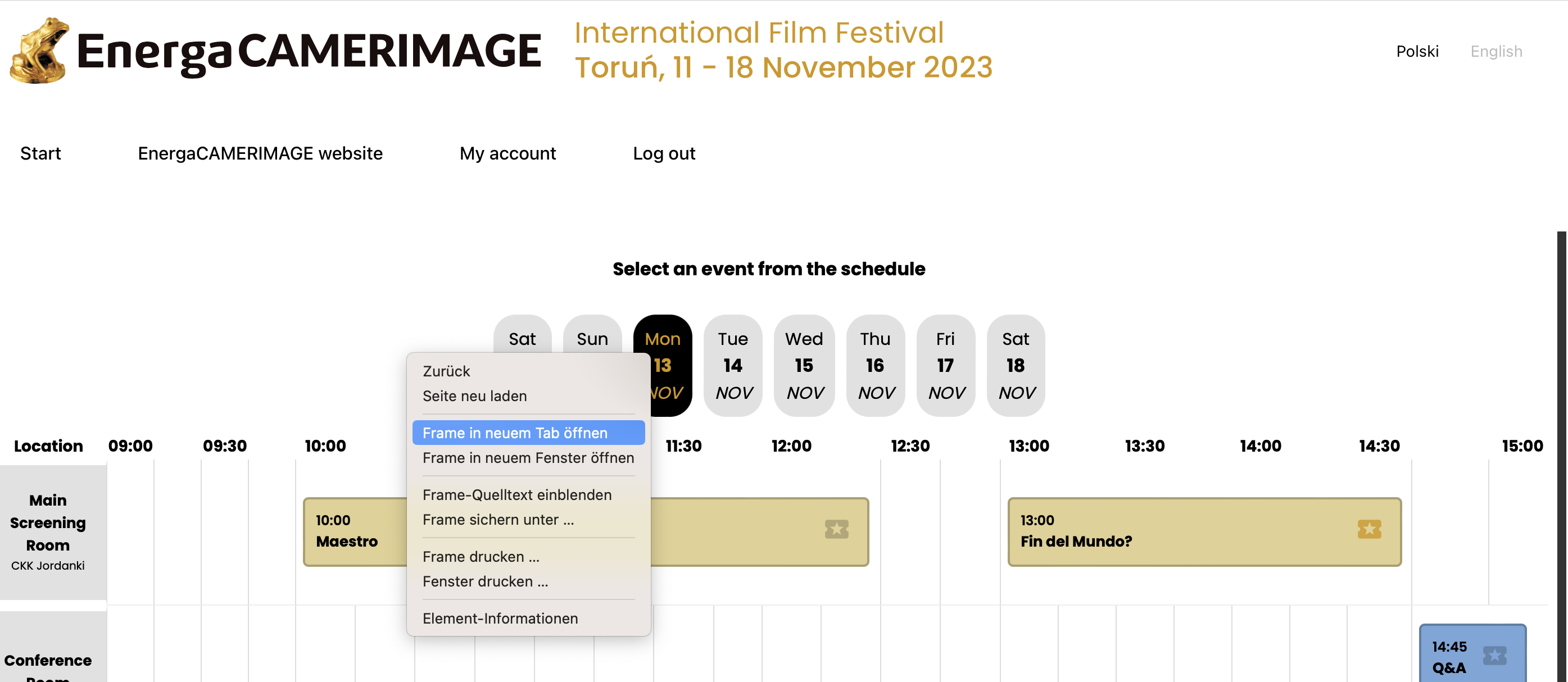
In the address bar of your browser you can now find your camerimage customer_id. Copy and paste it here into the login form.

About the tool

Since Camerimage has quite an annoying booking interface and forces you to get up right in time in the morning to book your desired events, in 2022 I started to write a little script to automatize that process for myself.
Now Camerimage blocked to book simeaultanious events, so I considered to write a tool which gives you at least the ability to plan upfront what to visit and let a server book it right in time for you, when events get bookable at 08:00 in the morning.
Just be aware that you only queue events which don't happen at the same time. The CI Server will reject that. This site is not doing any checks and just queueing up your request.

So have fun and enjoy the festival!

Contact me

Feel free to get in touch with me.
Kalle Kallovsky - 1st AC / OP
+49 151 51 95 90 17
info at kallovsky . de